Fuel Finder.
A practical web application for an everyday decision: where to fill up. Search, station details and a map help UK drivers compare their options.
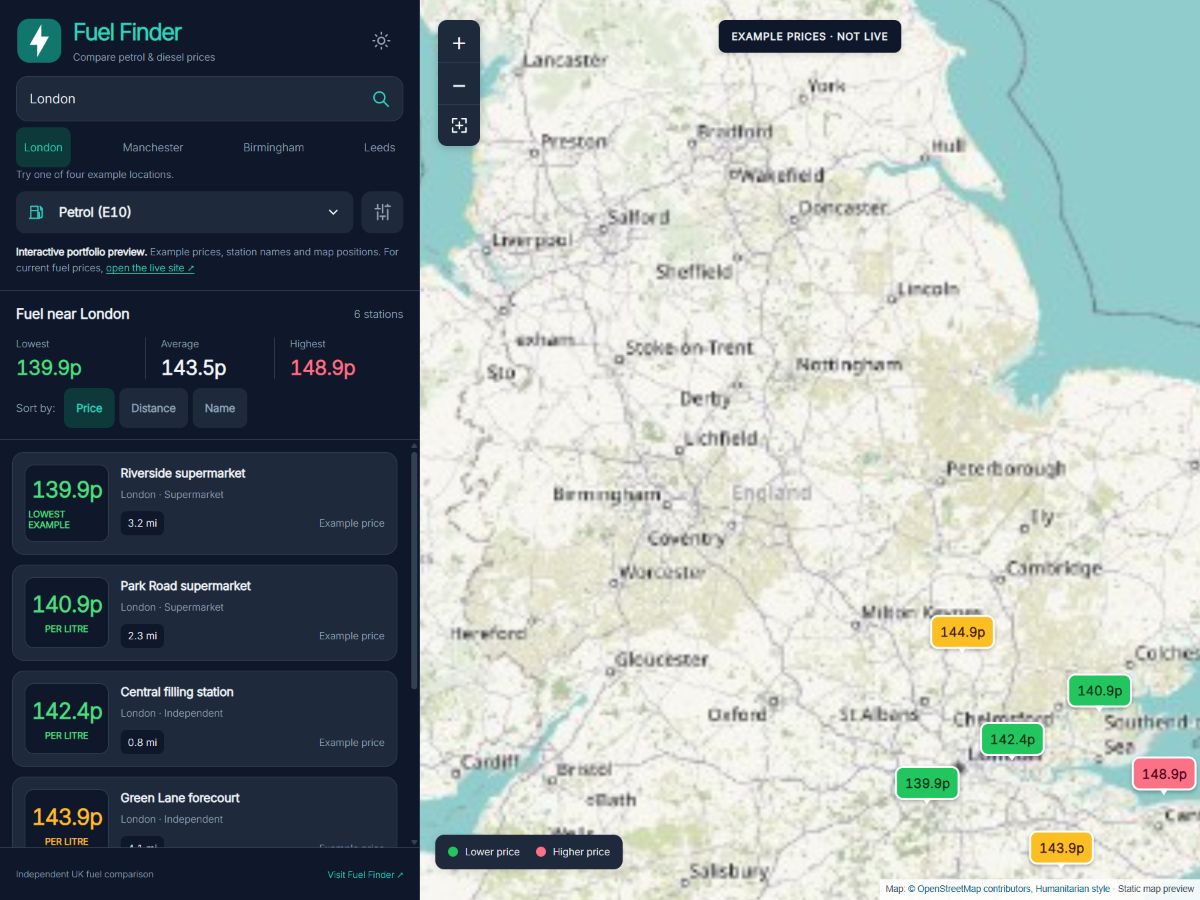
My own product, built end to end.
I built Fuel Finder as a personal project, covering the website and the application behind it. It brings together location search, fuel prices, station information and an interactive map to help UK drivers compare places to fill up.
The work extends from the database and server responses to the controls people use on their phones. A search needs the right stations and fuel type, but it also needs a readable result: where the station is, what price has been reported and how it compares with nearby options.
Built and used at scale.
Cloudflare Web Analytics reported around 770,000 visits and 9.82 million page views in September 2026.
A visit can include several page views; these figures do not represent unique people.
Compare the price and the place.
On the live website, visitors can search by postcode, town or city, choose a fuel type and adjust the search radius. Sorting by price, distance or how recently a price was updated gives different ways to examine the results. Brand and amenity filters help narrow the choice further.
The station list and map are connected parts of the interface. Cards make prices and station details easy to scan; map markers put those options in context. A lower price several miles away may be a different proposition from a nearby stop, so the location remains visible alongside the comparison.
Django behind the map.
The application uses Django for its backend, with database records for stations, different fuel prices and price history. The browser requests station information for the selected location, radius and fuel, then presents it through the list and map.
Leaflet provides the interactive map. JavaScript connects searches, filters, station selection and markers, while the backend supplies the information they use. Building both sides meant working through that whole path, from stored data to a result someone can act on. It is a concrete example of the custom web development I offer through Singular Structure.
A price needs context.
The data model records prices by fuel type and keeps dated history. The interface includes information about when prices were reported and offers a recently updated sort order. That distinction matters: checking a data feed again does not mean every station has just submitted a new price.
A comparison service has to carry that context through to the screen. The live site explains the difference between feed checks and individual reports, so visitors have more than an unexplained number to work with.
Keep the interface in step.
The desktop layout places the controls and results in a sidebar beside the map. On smaller screens, search and filter panels make the same tasks available without squeezing that desktop column into a phone. The design and development need to work together across both arrangements.
There are smaller engineering details behind that experience too. When someone changes a search, superseded requests are cancelled and late responses are ignored. An older result should not replace the location the person has just asked for. These details connect the interface to what the application is actually doing.
The CRT demo uses illustrative prices and map positions. Visit Fuel Finder for current results and the full application.
What should your website help people do?
Start with the task, the information and the people using it. We can work through what the website needs from there.